RouteReporter API
Contents
RouteReporter is a web-based route compliance tool that provides visibility of your fleet’s planned and post-trip routing activity while using CoPilot navigation. With RouteReporter, you can easily view and analyze data from vehicles in the field over a specified time, helping to ensure true route compliance and measure driver performance. The RouteReporter API is a RESTful API provides endpoints to retrieve trip information.
(Please note: The RouteReporter API is under public preview. This allows you to access and test new API features before they are officially released. This stage is designed for gathering feedback and making improvements based on your input. While the features are fully functional, breaking changes may occur without prior communication before the final release.)
What can you do with the RouteReporter API?
With this API, you can:
- Retrieve information for a specific trip including the origin and destination, vehicle information, the number of safety events, as well as statistics including planned and actual distance, toll costs, and time of travel.
- Retrieve information for all trips within a specified timeframe. The list of trips can be filtered based on: vehicle ID, vehicle group, driver ID, or driver group.
- Retrieve a detailed list of stops for the parent trip and all its modified child trips.
Getting started
To use the API, you must be licensed for RouteReporter and request access by contacting your Trimble Maps sales representative or our support team. You will be provided with an API key.
Authentication
Use the API key provided by Trimble to make a POST request for authentication to the server. If the authentication is successful, the server creates and sends a JSON Web Token (JWT) in the response.
To access the API resources, all subsequent requests must pass the JWT in the request header using the format: Authorization: Bearer {token}.
Authentication URLs
- AWS:
https://api.trimblemaps.com/identity/v2/token - Azure:
https://api.az.trimblemaps.com/identity/v2/token
Sample authentication request
{
  "apiKey": "string"
}
Sample authentication response
{
  "access_token": "dfjsdjfksdjkjfjklfjfkldfjdjkljdfklgjgjkgjkbljfkjlkfgjlkfjgfjkjhjjkhljklhjhjkhljhjhljhkjhklhgjhkjhgkljjhkjhkjhgkljhkjhgklhgjhgjhlkjgjhklgjkljgklhjkljfklhgjkhjklhjhkgljhkjjkhgjhkljhkgljhkhlgjhkjgjhklgjhklgjkhjgkljhklghfj",
  "token_type": "Bearer",
  "expires_in": 21600, //Time in seconds token will expire
  "refresh_token": "D9Hpn9283drz4X3MyxEVu4BWjKB4G0sI", //A token you can use to get a new access_token, after the initial token expires, without having to send the credentials again.
  "scope": "offline_access"
}
Terminology
Trip information is retrieved using the following IDs:
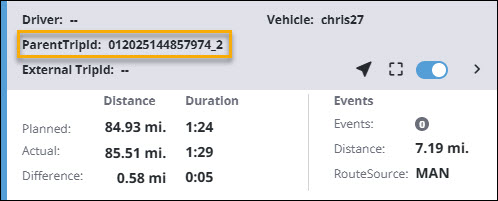
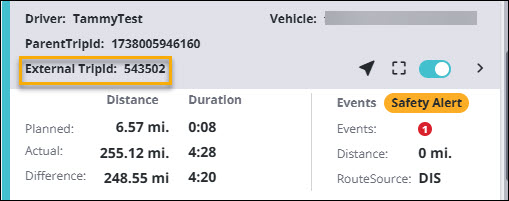
copilotTripId- The unique Trip ID that RouteReporter assigns to a CoPilot trip. In requests it’s referred to ascopilotTripId, and it maps to thetripIDfield in responses. In the RouteReporter web application, it is displayed as TripId or ParentTripId.externalTripId- Your own trip/shipment identifier from your TMS or dispatch system that RouteReporter stores alongside each CoPilot trip. The same ID may map to many RouteReporter trips.
Endpoints
The service’s endpoints are briefly described below. Use the left menu or scroll down this page for sample requests and parameter descriptions for each endpoint.
GET /trip
Retrieve information for a single trip via its copilotTripId. (Limit of 5 requests per second.)
Resource URLs
- AWS:
https://routereporterservice.trimblemaps.com/api/v1/trip?copilotTripId={id} - Azure:
https://routereporterservice.az.trimblemaps.com/api/v1/trip?copilotTripId={id}
API flow
To retrieve trip information, you will need the TripId or ParentTripId as shown in RouteReporter.
-
Authenticate your account and obtain an
access_token. Pass this token as the Bearer token in theAuthorizationheader for all subsequent requests. -
Make a GET request to the
/tripendpoint, including thecopilotTripIdparameter. This value should be the TripId or ParentTripId from the RouteReporter web application.
GET /trips
Retrieve an array of all CoPilot trips associated with a given externalTripId. (Limit of 100 requests per minute.) This endpoint allows you to compare data from the same trip—identified by its externalTripId—across many different drivers or vehicles over time.
Resource URLs
- AWS:
https://routereporterservice.trimblemaps.com/api/v1/trips?externalTripId={id}&pageNumber={pageNumber}
- Azure:
https://routereporterservice.az.trimblemaps.com/api/v1/trips?externalTripId={id}&pageNumber={pageNumber}
API flow
To retrieve trip information, you need the External TripId displayed in RouteReporter.
-
Authenticate your account and get an
access_token, which should be passed as the Bearer token in each subsequent request. -
Make a GET request to the
/tripsendpoint passing theexternalTripIddisplayed in RouteReporter. Up to 100 trips are returned per call. Use thepageNumberparameter to retrieve multiple pages if anexternalTripIdhas more than 100 trips. The first page is1. (e.g. sendpageNumber=2to retrieve trips 101-200.)
POST /search
Retrieve all CoPilot trips based on the search criteria provided in the request body. (Limit of 100 requests per minute.)
Resource URLs
- AWS:
https://routereporterservice.trimblemaps.com/api/v2/search - Azure:
https://routereporterservice.az.trimblemaps.com/api/v2/search
API flow
-
Authenticate your account and get an
access_token, which should be passed as the Bearer token in each subsequent request. -
You may also pass a single optional filter in the request body. Only one of the following filters is supported per API call: an array of
driverIds, adriverGroupName, an array ofvehicleIds, or avehicleGroupName. (Note:vehicleGroupNameis a future enhancement and is not currently available). Providing more than one filter in the request body will result in an error. -
The endpoint returns up to 100 trips per page. You must include the pageNumber parameter in your request to retrieve each page. The first page is
0(for trips 1–100); for example, sendpageNumber=1to retrieve trips 101–200. You can make up to 100 requests per minute.
Notes:
- Only one of these filters—
driverIds,driverGroupName,vehicleIds, orvehicleGroupName—is supported in a single API call. Providing more than one filter in the request body causes an error. - All filters are optional.
pageNumberis the only mandatory parameter in the request body. - If the
startDateandendDateare not provided in the request body, the API defaults to the last 7 days. - If both
startDateandendDateare provided, then trips that started within that timeframe are returned in the response. (The trip doesn’t need to be completed by theendDate. All the trips that have departed within the date range are returned.) - The maximum range you can query is any 30-day period during the past year.
POST /stops
Retrieve a comprehensive list of all stops associated with a trip, including origin, destination, and intermediate stops.
Resource URLs
- AWS:
https://routereporterservice.trimblemaps.com/api/v2/stops - Azure:
https://routereporterservice.az.trimblemaps.com/api/v2/stops
API flow
-
Authenticate your account and get an
access_token, which should be passed as the Bearer token in each subsequent request. -
Search for stops by passing either a
copilotTripIdorexternalTripIdin the body of your POST request.copilotTripIdis the TripId or ParentTripId displayed in RouteReporter, andexternalTripIdis displayed under the same name in RouteReporter. These values can also be retrieved by searching for trips using the/searchendpoint. -
A
pageNumberis also required in the request body. The first page is0(for trips 1–100); for example, sendpageNumber=1to retrieve trips 101–200. You can make up to 100 requests per minute. -
The endpoint returns a detailed list of stops for the parent trip and all its modified child trips. Each stop includes address details, coordinates, stop type, site name, and
customPlaceId(where applicable).
POST /gpspings
Retrieve all GPS pings associated with a specific trip. Limit of 1 request per second.
Resource URLs
- AWS:
https://routereporterservice.trimblemaps.com/api/v2/gpspings - Azure:
https://routereporterservice.az.trimblemaps.com/api/v2/gpspings
API flow
-
Authenticate your account and get an
access_token, which should be passed as the Bearer token in each subsequent request. -
Search for GPS pings by passing either a
copilotTripIdorexternalTripIdin the body of your POST request.copilotTripIdis the TripId or ParentTripId displayed in RouteReporter, andexternalTripIdis displayed under the same name in RouteReporter. These values can also be retrieved by searching for trips using the/searchendpoint. -
A
pageNumberis also required in the request body. The first page is0(for trips 1–100); for example, sendpageNumber=1to retrieve trips 101–200. You can make 1 request per second. -
The endpoint returns detailed information for each ping in the trip, including latitude, longitude, timestamp, speed, heading, and altitude.
POST /road_events
Retrieve all road events that occurred during a trip. Limit of 10 requests per second.
Resource URLs
- AWS:
https://routereporterservice.trimblemaps.com/api/v2/road_events - Azure:
https://routereporterservice.az.trimblemaps.com/api/v2/road_events
API flow
-
Authenticate your account and get an
access_token, which should be passed as the Bearer token in each subsequent request. -
Search for road events by passing either a
copilotTripIdorexternalTripIdin the body of your POST request.copilotTripIdis the TripId or ParentTripId displayed in RouteReporter, andexternalTripIdis displayed under the same name in RouteReporter. These values can also be retrieved by searching for trips using the/searchendpoint. -
A
pageNumberis also required in the request body. The first page is0(for trips 1–100); for example, sendpageNumber=1to retrieve trips 101–200. You can make up to 100 requests per minute. -
The endpoint returns trip details for events like “Left Route” and “Rejoined Route,” with data points for location, timestamp, and out-of-route mileage.
Events
Event Types:
LeftRoute: The driver diverged from the planned route.RejoinedRoute: The driver returned to the planned route.
Sample response
{
  "pageNumber": 0,
  "pageSize": 100,
  "totalPages": 1,
  "totalEvents": 2,
  "events": [
    {
      "eventId": "string",         // unique identifier
      "eventType": "LeftRoute",    // enum: LeftRoute, RejoinedRoute
      "timestamp": "2025-12-18T18:12:37Z",
      "location": {
        "lat": 40.123456,
        "lon": -74.123456
      },
      "oorDistance": 2.34,         // out‑of‑route distance in trip units
      "oorDuration": 300,          // seconds out of route (if available)
      "sequence": 1,               // order within trip
      "copilotTripId": "1731355367928",
      "parentTripId": "1731355367928",
      "externalTripId": "411706",
      "utcOffset": "-0500",        // if exposed
      "customPlaceId": "string or null" // if tied to a custom place
    }
  ]
}
POST /safety_events
Retrieve all safety-related events for a trip. Limit of 10 requests per second.
Resource URLs
- AWS:
https://routereporterservice.trimblemaps.com/api/v2/safety_events - Azure:
https://routereporterservice.az.trimblemaps.com/api/v2/safety_events
API flow
-
Authenticate your account and get an
access_token, which should be passed as the Bearer token in each subsequent request. -
Search for safety events by passing either a
copilotTripIdorexternalTripIdin the body of your POST request.copilotTripIdis the TripId or ParentTripId displayed in RouteReporter, andexternalTripIdis displayed under the same name in RouteReporter. These values can also be retrieved by searching for trips using the/searchendpoint. -
A
pageNumberis also required in the request body. The first page is0(for trips 1–100); for example, sendpageNumber=1to retrieve trips 101–200. You can make up to 100 requests per minute. -
The endpoint returns all safety events for the trip including event type, timestamp, location, and any other relevant information.
Events
Event Types:
Speed: Driver exceeded the speed alert threshold.RolloverRisk: Driver traveled above the safe speed for a high-rollover turn.RestrictedRoad: Driver entered a road restricted for the vehicle type.Idle: Driver idled for more than 5 minutes at a location that is not a designated stop.LowBridge: CoPilot displayed a low bridge warning.OutOfRoute: Driver left or rejoined the planned route.Weather: CoPilot displayed a weather notification during the trip.SuddenSlowdown: Driver received a warning about a traffic slowdown.TrafficDetour: Driver was prompted with and responded to a traffic detour.HosEvent: CoPilot issued a hours-of-service time-remaining warning.SuddenElevation: CoPilot issued a notification for a steep uphill or downhill grade.TrafficDetour (Closure): Driver was prompted with a traffic detour due to closure.
{
  "pageNumber": 0,
  "pageSize": 100,
  "totalPages": 1,
  "totalEvents": 12,
  "events": [
    {
      "eventId": "string",
      "eventType": "Speed",        // See enum list above
      "timestamp": "2025-12-18T18:12:37Z",
      "location": {
        "lat": 39.104528,
        "lon": -88.546931
      },
      "heading": 268,
      "copilotTripId": "080625115811899_3",
      "parentTripId": "10313829",
      "externalTripId": "500473679",
      "driverId": "546",
      "vehicleId": "string or null",
      "utcOffset": "-0600",
      "mapVersion": "GRD_ALK.NA.2025.02.21.7.1.1",
      "appVersion": "10.28.2.351",

      // One of the following typed payloads will be populated,
      // others present as null (per “all relevant attributes even if null”).[^]
      "speedEvent": {
        "currentSpeed": 67,
        "postedSpeed": 55
      },
      "rolloverEvent": {
        "currentSpeed": 42,
        "rolloverPostedSpeed": 27,
        "rolloverPostedLat": 35.285943,
        "rolloverPostedLon": -81.187014
      },
      "restrictedRoadEvent": {
        "roadRestrictionType": "general"
      },
      "idleEvent": {
        "idleDuration": 600    // seconds
      },
      "lowBridgeEvent": {
        "bridgeHeight": null   // if returned, otherwise null
      },
      "outOfRouteEvent": {
        "eventSubtype": "LeftRoute", // or RejoinedRoute
        "oorDistance": 0.5,
        "oorDuration": 120
      },
      "weatherEvent": {
        "weatherNotificationId": "396e266d-f9c8-4852-8121-9772c1fe3ed3",
        "roadRisk": "moderate",
        "impactSummary": "visibility",
        "impactsStartPoint": "-85236207,31174661",
        "impactsEndPoint": "-85109274,31133676"
      },
      "slowdownEvent": {
        "currentSpeed": 65,
        "beforeSlowdownSpeed": 62,
        "slowdownDropSpeed": 27,
        "slowdownGridLinkId": "45671140|19",
        "slowdownLat": 32.957554,
        "slowdownLon": -96.351695
      },
      "trafficDetourEvent": {
        "initialLat": 36.060017,
        "initialLon": -79.398190,
        "minutesSaved": 34,
        "newDistanceMeters": 124506,
        "newEta": "2025-08-04T12:41:05Z",
        "response": "Accepted",
        "trafficClosureInfo": "1100452,65;-94117631,44144487|"
      },
      "hosEvent": {
        "hosCategory": 0,      // 0 Break, 1 Driving, 2 OnDuty, 3 Cycle
        "timeRemainingMinutes": 15
      },
      "suddenElevationEvent": {
        "startLat": 38.567498,
        "startLon": -79.090300,
        "gridId": 1763596,
        "linkId": 153,
        "startSpeedKph": 72,
        "elevationType": "Uphill",
        "gradePercent": 20
      }
    }
  ]
}
cURL Guide
How to authenticate and search for trips with cURL commands.
Prerequisites
- cURL installed on your system
- A valid RouteReporter API key
Step 1: Authentication
Get a bearer token by sending your API key to the authentication endpoint:
curl -X POST "https://api.trimblemaps.com/identity/v2/token" \
  -H "Content-Type: application/json" \
  -d '{"apiKey": "YOUR_API_KEY_HERE"}'
Response:
{
  "access_token": "eyJhbGciOiJSUzI1NiIsInR5cCI...",
  "token_type": "Bearer",
  "expires_in": 21600,
  "refresh_token": "D9Hpn9283drz4X3MyxEVu4BWjKB4G0sI",
  "scope": "offline_access"
}
Save the access_token value for use in subsequent requests.
Step 2: Search Trips
Use the bearer token to search for trips within a date range:
curl -X POST "https://routereporterservice.trimblemaps.com/api/v2/search" \
  -H "Content-Type: application/json" \
  -H "Authorization: bearer YOUR_ACCESS_TOKEN_HERE" \
  -d '{
    "startDate": "2025-12-17T00:00:00",
    "endDate": "2025-12-18T00:00:00",
    "pageNumber": 0
  }'
Response:
{
  "responseMessage": "Success",
  "results": [
    {
      "tripID": "1731355367928",
      "externalTripID": "411706",
      "vehicleID": "39462118",
      "vehicleName": "TestVehicle",
      "status": "Completed",
      "plannedDistance": 6.57,
      "actualDistance": 6.34,
      "startTime": "2024-11-11T20:02:47",
      "endTime": "2024-11-12T02:15:47"
    }
  ],
  "pageNumber": 0,
  "totalPages": 5,
  "totalTrips": 47
}
Pagination
If totalPages is greater than 1, fetch additional pages by incrementing pageNumber:
curl -X POST "https://routereporterservice.trimblemaps.com/api/v2/search" \
  -H "Content-Type: application/json" \
  -H "Authorization: bearer YOUR_ACCESS_TOKEN_HERE" \
  -d '{
    "startDate": "2025-12-17T00:00:00",
    "endDate": "2025-12-18T00:00:00",
    "pageNumber": 1
  }'
Filtering Results
You can optionally filter trips by adding parameters to the request body:
curl -X POST "https://routereporterservice.trimblemaps.com/api/v2/search" \
  -H "Content-Type: application/json" \
  -H "Authorization: bearer YOUR_ACCESS_TOKEN_HERE" \
  -d '{
    "startDate": "2025-12-17T00:00:00",
    "endDate": "2025-12-18T00:00:00",
    "pageNumber": 0,
    "vehicleIds": ["vehicle1", "vehicle2"],
    "driverIds": ["driver1", "driver2"],
    "vehicleGroupName": "MyVehicleGroup",
    "driverGroupName": "MyDriverGroup",
    "hasEvents": true
  }'
Rate Limiting
- The search endpoint is limited to 100 requests per minute
- If you receive a
429 Too Many Requestsresponse, wait for the time specified in theretry-afterheader (typically 60 seconds) before retrying
JavaScript Guide
How to export a day’s worth of trip data from the RouteReporter API using JavaScript with the Fetch API (browser-compatible).
Prerequisites
- Modern web browser with Fetch API support
- Or Node.js 18+ (which includes native fetch)
Code Sample
// =============================================================================
// CONFIGURATION
// =============================================================================

// Replace with your actual API key
const API_KEY = "YOUR_API_KEY_HERE";

// API Endpoints
const AUTH_URL = "https://api.trimblemaps.com/identity/v2/token";
const SEARCH_URL = "https://routereporterservice.trimblemaps.com/api/v2/search";

// =============================================================================
// UTILITY FUNCTIONS
// =============================================================================

/**
 * Sleep for a specified number of milliseconds
 * @param {number} ms - Milliseconds to sleep
 * @returns {Promise} Promise that resolves after the delay
 */
function sleep(ms) {
    return new Promise(resolve => setTimeout(resolve, ms));
}

/**
 * Format a date as ISO string without timezone (YYYY-MM-DDTHH:mm:ss)
 * @param {Date} date - Date to format
 * @returns {string} Formatted date string
 */
function formatDate(date) {
    return date.toISOString().slice(0, 19);
}

// =============================================================================
// AUTHENTICATION
// =============================================================================

/**
 * Authenticate with the Trimble Maps API and retrieve an access token.
 * @param {string} apiKey - Your RouteReporter API key
 * @returns {Promise<string>} The access token
 * @throws {Error} If authentication fails
 */
async function getAccessToken(apiKey) {
    const response = await fetch(AUTH_URL, {
        method: "POST",
        headers: {
            "Content-Type": "application/json"
        },
        body: JSON.stringify({
            apiKey: apiKey
        })
    });

    if (!response.ok) {
        const errorText = await response.text();
        throw new Error(`Authentication failed: ${response.status} - ${errorText}`);
    }

    const tokenData = await response.json();
    return tokenData.access_token;
}

// =============================================================================
// TRIP SEARCH WITH PAGINATION
// =============================================================================

/**
 * Search for all trips within the specified date range.
 * Handles pagination automatically and respects rate limits.
 * @param {string} accessToken - Bearer token from authentication
 * @param {Date} startDate - Start of date range
 * @param {Date} endDate - End of date range
 * @returns {Promise<Array>} List of all trip objects
 */
async function searchTrips(accessToken, startDate, endDate) {
    const headers = {
        "Content-Type": "application/json",
        "Authorization": `bearer ${accessToken}`
    };

    // Variable to store all trips from all pages
    let allTrips = [];

    let pageNumber = 0;
    let totalPages = null;

    while (true) {
        const payload = {
            startDate: formatDate(startDate),
            endDate: formatDate(endDate),
            pageNumber: pageNumber
        };

        console.log(`Fetching page ${pageNumber}${totalPages ? '/' + totalPages : ''}...`);

        const response = await fetch(SEARCH_URL, {
            method: "POST",
            headers: headers,
            body: JSON.stringify(payload)
        });

        // Handle rate limiting (429 Too Many Requests)
        if (response.status === 429) {
            // Get retry-after header, default to 60 seconds
            const retryAfter = parseInt(response.headers.get("retry-after") || "60", 10);
            console.log(`Rate limited. Waiting ${retryAfter} seconds before retrying...`);
            await sleep(retryAfter * 1000);
            continue; // Retry the same page
        }

        if (!response.ok) {
            const errorText = await response.text();
            throw new Error(`Search failed: ${response.status} - ${errorText}`);
        }

        const data = await response.json();

        // Extract results and add to our collection
        const results = data.results || [];
        allTrips = allTrips.concat(results);

        // Get pagination info from first response
        if (totalPages === null) {
            totalPages = data.totalPages || 1;
            const totalTrips = data.totalTrips || 0;
            console.log(`Total trips to fetch: ${totalTrips} across ${totalPages} page(s)`);
        }

        console.log(`  Retrieved ${results.length} trips from page ${pageNumber}`);

        // Check if we've fetched all pages (pages are zero-based: 0 .. totalPages - 1)
        if (pageNumber >= totalPages - 1) {
            break;
        }

        // Move to next page
        pageNumber++;

        // Rate limiting: pause 1 second between requests
        await sleep(1000);
    }

    return allTrips;
}

// =============================================================================
// MAIN EXECUTION
// =============================================================================

/**
 * Main function to export a day's worth of trips from RouteReporter.
 * @returns {Promise<Array>} All trips from the last 24 hours
 */
async function exportTrips() {
    console.log("=".repeat(60));
    console.log("RouteReporter Trip Export");
    console.log("=".repeat(60));

    // Step 1: Authenticate
    console.log("\n[1/3] Authenticating...");
    let accessToken;
    try {
        accessToken = await getAccessToken(API_KEY);
        console.log("  Authentication successful!");
    } catch (error) {
        console.error(`  ERROR: ${error.message}`);
        return [];
    }

    // Step 2: Calculate date range (last 24 hours)
    console.log("\n[2/3] Setting up date range...");
    const endDate = new Date();
    const startDate = new Date(endDate.getTime() - 24 * 60 * 60 * 1000); // 24 hours ago
    console.log(`  From: ${startDate.toLocaleString()}`);
    console.log(`  To:   ${endDate.toLocaleString()}`);

    // Step 3: Fetch all trips
    console.log("\n[3/3] Fetching trips...");
    let allTrips;
    try {
        allTrips = await searchTrips(accessToken, startDate, endDate);
    } catch (error) {
        console.error(`  ERROR: ${error.message}`);
        return [];
    }

    // ==========================================================================
    // ALL COMPLETE!
    // The 'allTrips' variable now contains all trip data from the last 24 hours.
    // Each trip is an object with fields like:
    //   - tripID
    //   - externalTripID
    //   - vehicleID, vehicleName
    //   - driverID, driverName
    //   - status (InProgress, Completed, Canceled, Modified, Planned)
    //   - plannedDistance, actualDistance
    //   - plannedDuration, actualDuration
    //   - origin, destination
    //   - startTime, endTime
    //   - and more...
    // ==========================================================================

    console.log("\n" + "=".repeat(60));
    console.log("EXPORT COMPLETE!");
    console.log("=".repeat(60));
    console.log(`Total trips retrieved: ${allTrips.length}`);
    console.log("\nThe 'allTrips' variable contains all trip data.");
    console.log("You can now process, save, or analyze this data as needed.");

    // Example: Print first trip summary (if any trips exist)
    if (allTrips.length > 0) {
        const firstTrip = allTrips[0];
        console.log("\nSample trip data (first trip):");
        console.log(`  Trip ID: ${firstTrip.tripID}`);
        console.log(`  Vehicle: ${firstTrip.vehicleName} (${firstTrip.vehicleID})`);
        console.log(`  Status: ${firstTrip.status}`);
        console.log(`  Distance: ${firstTrip.actualDistance} miles`);
    }

    return allTrips;
}

// =============================================================================
// RUN THE EXPORT
// =============================================================================

// Execute the export and store results
let allTrips;
exportTrips().then(trips => {
    allTrips = trips;
    // You can now work with allTrips here
    // Example: console.log(JSON.stringify(allTrips, null, 2));
});
How It Works
1. Authentication
The script first authenticates with the Trimble Maps identity service using your API key. This returns a bearer token that’s used for all subsequent API calls.
2. Date Range Calculation
The script automatically calculates the date range from the current time to 24 hours prior.
3. Paginated Search
The /api/v2/search endpoint returns paginated results. The script:
- Fetches the first page to determine total pages
- Loops through all pages, collecting results
- Waits 1 second between requests to respect rate limits
4. Rate Limit Handling
If the API returns a 429 Too Many Requests error, the script:
- Reads the
retry-afterheader (defaults to 60 seconds) - Waits the specified time
- Retries the same request
Filtering Results
You can optionally filter trips by adding parameters to the search request:
const payload = {
    startDate: formatDate(startDate),
    endDate: formatDate(endDate),
    pageNumber: pageNumber,
    // Optional filters:
    vehicleIds: ["vehicle1", "vehicle2"],      // Filter by specific vehicles
    driverIds: ["driver1", "driver2"],         // Filter by specific drivers
    vehicleGroupName: "MyVehicleGroup",        // Filter by vehicle group
    driverGroupName: "MyDriverGroup",          // Filter by driver group
    hasEvents: true                            // Only trips with events
};
Python Guide
How to export a day’s worth of trip data from the RouteReporter API using Python.
Prerequisites
- Python 3.7+
requestslibrary (pip install requests)
Code Sample
import requests
import time
from datetime import datetime, timedelta

# =============================================================================
# CONFIGURATION
# =============================================================================

# Replace with your actual API key
API_KEY = "YOUR_API_KEY_HERE"

# API Endpoints
AUTH_URL = "https://api.trimblemaps.com/identity/v2/token"
SEARCH_URL = "https://routereporterservice.trimblemaps.com/api/v2/search"

# =============================================================================
# AUTHENTICATION
# =============================================================================

def get_access_token(api_key):
    """
    Authenticate with the Trimble Maps API and retrieve an access token.

    Args:
        api_key: Your RouteReporter API key

    Returns:
        The access token string

    Raises:
        Exception: If authentication fails
    """
    headers = {
        "Content-Type": "application/json"
    }

    payload = {
        "apiKey": api_key
    }

    response = requests.post(AUTH_URL, json=payload, headers=headers)

    if response.status_code != 200:
        raise Exception(f"Authentication failed: {response.status_code} - {response.text}")

    token_data = response.json()
    return token_data["access_token"]

# =============================================================================
# TRIP SEARCH WITH PAGINATION
# =============================================================================

def search_trips(access_token, start_date, end_date):
    """
    Search for all trips within the specified date range.
    Handles pagination automatically and respects rate limits.

    Args:
        access_token: Bearer token from authentication
        start_date: Start of date range (datetime object)
        end_date: End of date range (datetime object)

    Returns:
        List of all trip objects
    """
    headers = {
        "Content-Type": "application/json",
        "Authorization": f"bearer {access_token}"
    }

    # Variable to store all trips from all pages
    all_trips = []

    page_number = 0
    total_pages = None

    while True:
        payload = {
            "startDate": start_date.strftime("%Y-%m-%dT%H:%M:%S"),
            "endDate": end_date.strftime("%Y-%m-%dT%H:%M:%S"),
            "pageNumber": page_number
        }

        print(f"Fetching page {page_number}{'/' + str(total_pages) if total_pages else ''}...")

        response = requests.post(SEARCH_URL, json=payload, headers=headers)

        # Handle rate limiting (429 Too Many Requests)
        if response.status_code == 429:
            # Get retry-after header, default to 60 seconds
            retry_after = int(response.headers.get("retry-after", 60))
            print(f"Rate limited. Waiting {retry_after} seconds before retrying...")
            time.sleep(retry_after)
            continue  # Retry the same page

        if response.status_code != 200:
            raise Exception(f"Search failed: {response.status_code} - {response.text}")

        data = response.json()

        # Extract results and add to our collection
        results = data.get("results", [])
        all_trips.extend(results)

        # Get pagination info from first response
        if total_pages is None:
            total_pages = data.get("totalPages", 1)
            total_trips = data.get("totalTrips", 0)
            print(f"Total trips to fetch: {total_trips} across {total_pages} page(s)")

        print(f"  Retrieved {len(results)} trips from page {page_number}")

        # Check if we've fetched all pages
        if page_number >= total_pages:
            break

        # Move to next page
        page_number += 1

        # Rate limiting: pause 1 second between requests
        time.sleep(1)

    return all_trips

# =============================================================================
# MAIN EXECUTION
# =============================================================================

def main():
    """
    Main function to export a day's worth of trips from RouteReporter.
    """
    print("=" * 60)
    print("RouteReporter Trip Export")
    print("=" * 60)

    # Step 1: Authenticate
    print("\n[1/3] Authenticating...")
    try:
        access_token = get_access_token(API_KEY)
        print("  Authentication successful!")
    except Exception as e:
        print(f"  ERROR: {e}")
        return

    # Step 2: Calculate date range (last 24 hours)
    print("\n[2/3] Setting up date range...")
    end_date = datetime.now()
    start_date = end_date - timedelta(days=1)
    print(f"  From: {start_date.strftime('%Y-%m-%d %H:%M:%S')}")
    print(f"  To:   {end_date.strftime('%Y-%m-%d %H:%M:%S')}")

    # Step 3: Fetch all trips
    print("\n[3/3] Fetching trips...")
    try:
        all_trips = search_trips(access_token, start_date, end_date)
    except Exception as e:
        print(f"  ERROR: {e}")
        return

    # ==========================================================================
    # ALL COMPLETE!
    # The 'all_trips' variable now contains all trip data from the last 24 hours.
    # Each trip is a dictionary with fields like:
    #   - tripID
    #   - externalTripID
    #   - vehicleID, vehicleName
    #   - driverID, driverName
    #   - status (InProgress, Completed, Canceled, Modified, Planned)
    #   - plannedDistance, actualDistance
    #   - plannedDuration, actualDuration
    #   - origin, destination
    #   - startTime, endTime
    #   - and more...
    # ==========================================================================

    print("\n" + "=" * 60)
    print("EXPORT COMPLETE!")
    print("=" * 60)
    print(f"Total trips retrieved: {len(all_trips)}")
    print("\nThe 'all_trips' variable contains all trip data.")
    print("You can now process, save, or analyze this data as needed.")

    # Example: Print first trip summary (if any trips exist)
    if all_trips:
        first_trip = all_trips[0]
        print("\nSample trip data (first trip):")
        print(f"  Trip ID: {first_trip.get('tripID')}")
        print(f"  Vehicle: {first_trip.get('vehicleName')} ({first_trip.get('vehicleID')})")
        print(f"  Status: {first_trip.get('status')}")
        print(f"  Distance: {first_trip.get('actualDistance')} miles")

    return all_trips


if __name__ == "__main__":
    # Run the export and store results
    all_trips = main()
How It Works
1. Authentication
The script first authenticates with the Trimble Maps identity service using your API key. This returns a bearer token that’s used for all subsequent API calls.
2. Date Range Calculation
The script automatically calculates the date range from the current time to 24 hours prior.
3. Paginated Search
The /api/v2/search endpoint returns paginated results. The script:
- Fetches the first page to determine total pages
- Loops through all pages, collecting results
- Waits 1 second between requests to respect rate limits
4. Rate Limit Handling
If the API returns a 429 Too Many Requests error, the script:
- Reads the
retry-afterheader (defaults to 60 seconds) - Waits the specified time
- Retries the same request
Filtering Results
You can optionally filter trips by adding parameters to the search request:
payload = {
    "startDate": start_date.strftime("%Y-%m-%dT%H:%M:%S"),
    "endDate": end_date.strftime("%Y-%m-%dT%H:%M:%S"),
    "pageNumber": page_number,
    # Optional filters:
    "vehicleIds": ["vehicle1", "vehicle2"],      # Filter by specific vehicles
    "driverIds": ["driver1", "driver2"],         # Filter by specific drivers
    "vehicleGroupName": "MyVehicleGroup",        # Filter by vehicle group
    "driverGroupName": "MyDriverGroup",          # Filter by driver group
    "hasEvents": True                            # Only trips with events
}