Dwell Time API
Contents
The Dwell Time API gives you the ability to calculate dwell times for your assets at millions of warehouses, distribution centers, and other business-critical locations across North America. It computes dwell times by monitoring when an asset’s GPS location crosses a geofence around the perimeter of a location upon arrival and departure.
It can also use this information to provide:
- Visibility and tracking, with automatic arrival and departure notifications sent to your TMS or other workflow—no need for a driver to report their location.
- Historical dwell time information based on your driver’s past trips for the millions of locations in the Trimble Maps places database.
With arrival and departure information, and dwell time, the service can provide shippers and carriers with a third party “source of truth” for disputes over how long an asset was detained.
Contact us to learn how to gain access to this API.
How this service is different
Most mapping and routing applications provide geofences as a simple circle around a location—a center point with a radius. Assets are marked as arrived or departed if they cross that circle. This often leads to false notifications when that circle crosses over roads outside of the location you’re trying to monitor.
With the Trimble Maps service, geofence polygons are set around the exact perimeter of the location, without intersecting nearby roads. That way, you can be sure an asset has actually arrived or departed when you get a notification.
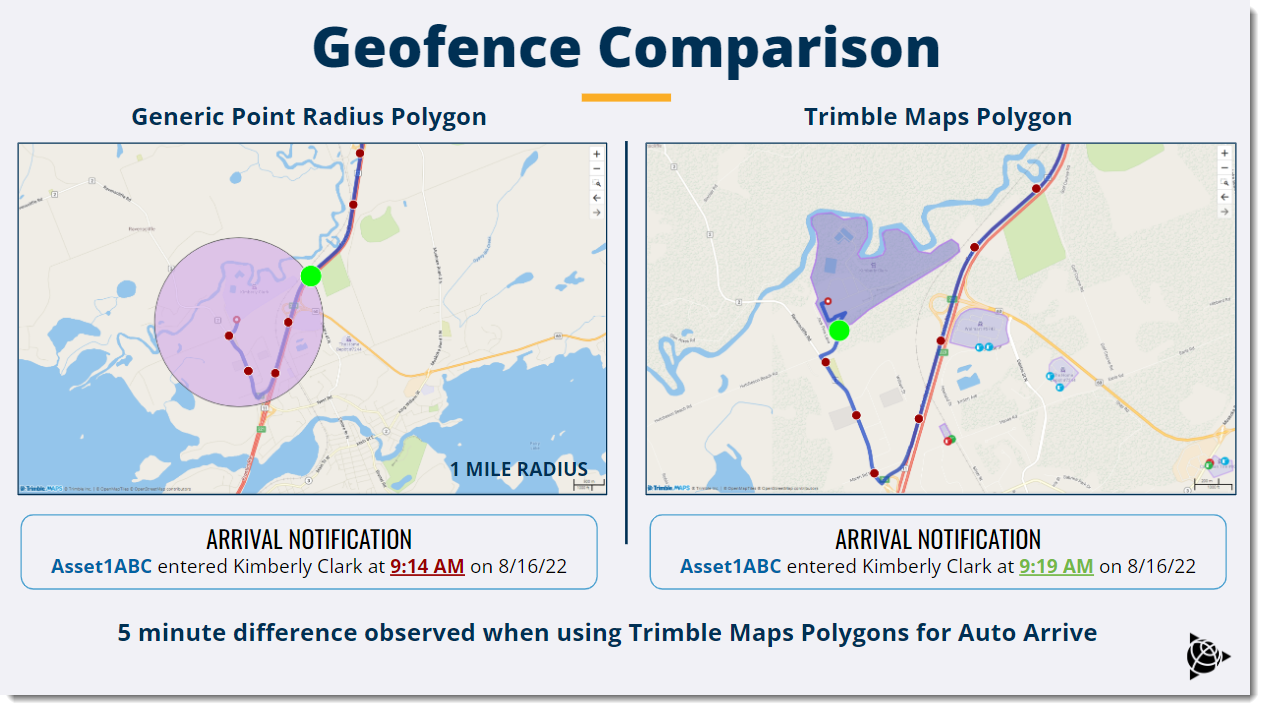
The service is built on a library of locations that is constantly updated and expanded by our team of mapping experts. There is no need to maintain your own location data.
Prerequisites
The service is licensed as part of a Web Services subscription. Contact us to learn how to gain access to this API.
Use cases
- Receive automatic arrival & departure notifications for a location
- Track vehicles
- Retrieve dwell time information for a location
Concepts
Some key concepts to understand before using the API.
- Geofence - A geographic area around the exact perimeter of a location. Trimble Maps has geofences around millions of locations in North America that serve the transportation industry. These places range from distribution centers and manufacturing facilities to truck stops and rest areas.
- Asset - A tractor, a trailer, or a truck. Assets are identified by a unique
assetId. - trimblePlaceId - The identifier for a location in the Trimble Maps database. The ID is used to call dwell time information about a location. A
trimblePlaceIdcan be retrieved using the Single Search Geocoding API.
Authentication
Authentication for the Dwell Time API relies on JSON Web Tokens (JWT). You can use your API key provided by Trimble Maps to request a token from the Identity Validation API. The server will validate the API key and return a token to the client. This token can then be used to make calls to all other endpoints in the Dwell Time API.
To retrieve a JWT:
- Make a POST call to
https://api.trimblemaps.com/identity/v1/tokenwith the following POST body:
{
  "apikey": "string"
}
- Pass in the
jsonWebTokenthat is returned when making requests to any of the Dwell Time API endpoints by using the following header:
"Authorization": "jsonWebToken={jsonWebToken}"
Sample curl request
Below is a sample curl request to the /geofence/gps endpoint with the appropriate authorization header. (Replace the sample jsonWebToken value with the appropriate token generated with the /identity/v1/token API call in Step 1 above.)
curl --location --request POST 'https://api.trimblemaps.com/geofence/gps' \
--header 'Authorization: jsonWebToken={Insert token}' \
--header 'Content-Type: application/json' \
--data-raw '{
  "tripId": 0,
  "externalTripId": "externalTripId",
  "assetId": "Truck #3452",
  "externalVehicleName": "Truck #3452",
  "assetType": 0,
  "positions": [
    {
      "coord": {
        "lat": 41.230504319,
        "lon": -86.721496407
      },
      "speed": 10,
      "heading": 15,
      "altitude": 300,
      "deviceDt": "2023-01-12T12:46:00.177Z"
    }

  ],

  "telematicsPartnerName": "Test Partner",
  "cargoStatus": "optional"
}'
Getting started
Below are the most common use cases for the Dwell Time API, and the workflow required to accomplish them.
Automatic arrival & departure notifications
The service takes in an asset’s location coordinates from a telematics feed and determines when it intersects with a Trimble Maps geofence polygon around the site. At the time of intersection (either entering or departing a site polygon), an automatic arrival or departure notification can be triggered and fed into your workflow.
Benefits
- Provides a more accurate, convenient alternative to a driver manually selecting “arrived” or “departed” in a telematics device. Avoids false positive notifications generated by a generic point radius circle around a location.
- Automatically covers arrivals or departures at millions of commercial locations across North America that serve the transportation industry.
API Workflow
- You can feed your positions into the Dwell Time API using a POST call to /geofence/gps, or connect your telematics feed directly to our service. (This connection is already available for Trimble Transportation customers.)
- Add a new asset:
- When we receive the GPS pings, we identify whether it is a new asset (based on its
assetId) and, if so, add it to the given account.
- When we receive the GPS pings, we identify whether it is a new asset (based on its
- A websocket that is connected to a queue sends automatic PUSH notifications with an asset’s arrival and departure details.
Tracking and visibility
The service also provides a historical overview of arrival and departure events. It can help you understand where an asset is currently located, as well as which locations it has visited during the past 365 days.
Benefits
- Can help identify assets that are available to move around for nearby jobs.
- Can help prove unauthorized use of assets that are detained at a location for an extended period. (i.e. A trailer being used for storage.)
API Workflow
- You can feed your positions into the Dwell Time API using a POST call to /geofence/gps, or you can connect your telematics feed directly to our service. (This connection is already available for Trimble Transportation customers.)
- Add a new asset:
- When we receive the GPS pings, we identify whether it is a new asset (based on its
assetId) and, if so, add it to the given account.
- When we receive the GPS pings, we identify whether it is a new asset (based on its
- An asset’s live location can then be tracked one of three ways:
- By ID: Make a GET call to /geofence/track/asset/{assetId} - This endpoint gets the live GPS location for a specific asset when searched by its ID.
- By Asset Type: Make a GET call to /geofence/track/asset/type/{assetType} - This endpoint gets the live GPS location of all assets of a specific type.
- By Coordinates: Make a GET call to /geofence/track/asset/coordinates - This endpoint retrieves all the assets in that account present at the given location (coordinates)
- Separately, you can track the history of an asset’s locations with a GET call to /geofence/report/asset/{assetId}/places - This endpoint gets all the locations visited by a given asset in the past 365 days.
Dwell times
The service calculates exact dwell times for a given asset based on when it entered and exited a detailed site polygon.
Benefits
- Provides a neutral third-party standardized “source of truth” for how long an asset was detained at a location.
- Can be used by shippers to prove overall dwell time in the event of requesting detention fee (carriers) or disputing the fee (shippers).
API Workflow
- You can feed your positions into the Dwell Time API using a POST call to /geofence/gps, or you can connect your telematics feed directly to our service. (This connection is already available for Trimble Transportation customers.)
- Add a new asset:
- When we receive the GPS pings, we identify whether it is a new asset (based on its
assetId) and, if so, add it to the given account.
- When we receive the GPS pings, we identify whether it is a new asset (based on its
- Retrieve the dwell time for the asset with a GET call to /geofence/report/asset/{assetId}/places - This endpoint retrieves the dwell time for a given asset at any facilities it has visited within a selected timeframe.
Improved Dispatch
The service not only provides “live” dwell times for an asset, it draws from a variety of sources to calculate average dwell times by facility, by hour. This can help you better plan for when an asset should visit that location.
Benefits
- Can help with forecasting based on historical trends—predict upcoming changes to dwell time based on season, weather, etc.
- Can help predict dwell times based on vehicle type (i.e. refrigerated truck vs. dry van) or based on cargo status (loading, unloading).
API Workflow
- You can feed your positions into the Dwell Time API using a POST call to /geofence/gps, or you can connect your telematics feed directly to our service. (This connection is already available for Trimble Transportation customers.)
- Add a new asset:
- When we receive the GPS pings, we identify whether it is a new asset (based on its
assetId) and, if so, add it to the given account.
- When we receive the GPS pings, we identify whether it is a new asset (based on its
- Over time, the service collects arrival and departure times for assets and it uses that information to calculate the average dwell time, for each hour of the day, for a location.
- Make a GET call to /geofence/dwelltime/place/{trimblePlaceId} - This endpoint retrieves average dwell time by hour for a given place as identified by its
trimblePlaceId.