Map styles
The Mobile Maps SDK examples require that you first complete the initial project set-up.
Set the map to night, day, or satellite.
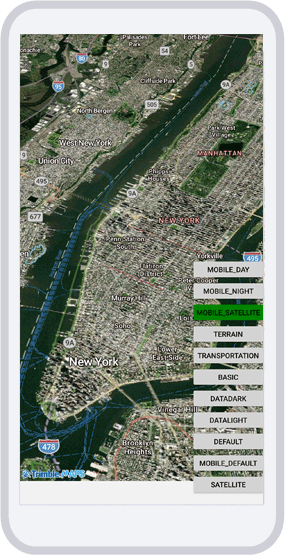
MapStyles.xaml
<?xml version="1.0" encoding="utf-8" ?>
<ContentPage xmlns="http://schemas.microsoft.com/dotnet/2021/maui"
             xmlns:x="http://schemas.microsoft.com/winfx/2009/xaml"
             x:Class="TrimbleMaps.MapSDK.Sample.MapStyles"
             Title="MapStyles" xmlns:TrimbleMaps="clr-namespace:TrimbleMaps.Controls.Forms;assembly=TrimbleMaps.MapsSDK">
    <Grid>
        <!-- MapView as the background -->
        <TrimbleMaps:MapView
            x:Name="Map"
            ShowUserLocation="true"
            UserLocationTracking="None"
            ZoomMaxLevel="21"
            CompassEnabled="True"
            CompassFadeFacingNorth="False" />

        <!-- VerticalStackLayout for the button -->
        <VerticalStackLayout Padding="20" Spacing="10" VerticalOptions="End">
            <Button Text="MOBILE DAY"
                    Clicked="OnClickChangeStyle"
                    BackgroundColor= "#FAF5F5"
                    TextColor="Black"
                    CornerRadius="10"
                    HorizontalOptions="End"
                    VerticalOptions= "End"
                    CommandParameter="MOBILE_DAY" />
            <Button Text="MOBILE NIGHT"
                    Clicked="OnClickChangeStyle"
                    BackgroundColor= "#FAF5F5"
                    TextColor="Black"
                    CornerRadius="10"
                    HorizontalOptions="End"
                    VerticalOptions= "End"
                    CommandParameter="MOBILE_NIGHT" />
            <Button Text="MOBILE SATELLITE"
                    Clicked="OnClickChangeStyle"
                    BackgroundColor= "#FAF5F5"
                    TextColor="Black"
                    CornerRadius="10"
                    HorizontalOptions="End"
                    VerticalOptions= "End"
                    CommandParameter="MOBILE_SATELLITE" />
        </VerticalStackLayout>
    </Grid>
</ContentPage>
MapStyles.xaml.cs
using CommunityToolkit.Maui.Alerts;
using CommunityToolkit.Maui.Core;
using TrimbleMaps.Controls.Forms;

namespace TrimbleMaps.MapSDK.Sample
{
    public partial class MapStyles : ContentPage
    {
        public MapStyles()
        {
            InitializeComponent();
            Setup();
        }

        private void Setup()
        {
            Map.Center = new TrimbleMaps.MapsSDK.LatLng(40.7584766, -73.9840227);
            Map.ZoomMinLevel = 13;
            Map.MapStyle = MapStyle.MOBILE_DAY;
        }

        private void OnClickChangeStyle(object sender, EventArgs e)
        {
            if (sender is Button button && button.CommandParameter is string page)
            {
                switch (page)
                {
                    case "MOBILE_DAY":
                        Map.MapStyle = MapStyle.MOBILE_DAY;
                        Toast.Make("MOBILE_DAY is enabled", ToastDuration.Short, 14).Show();
                        break;
                    case "MOBILE_NIGHT":
                        Map.MapStyle = MapStyle.MOBILE_NIGHT;
                        Toast.Make("MOBILE_NIGHT is enabled", ToastDuration.Short, 14).Show();
                        break;
                    case "MOBILE_SATELLITE":
                        Map.MapStyle = MapStyle.MOBILE_SATELLITE;
                        Toast.Make("MOBILE_SATELLITE is enabled", ToastDuration.Short, 14).Show();
                        break;
                }
            }
        }
    }
}